
Download WatermarkIt – Photo Protection, Batch Watermarking, Customizable Watermarks
Overview
WatermarkIt is a lightweight mobile application designed to protect digital photographs by adding visible, transparent watermarks prior to sharing or uploading. The app addresses the growing concern among photographers, content creators, and social media users who seek to prevent unauthorized use of their visual content. By embedding personalized identifiers directly onto images, WatermarkIt ensures that photos remain traceable and legally protected. The target audience includes amateur and professional photographers, digital artists, bloggers, and anyone who shares images online and wants to maintain ownership and credit.
Although the developer did not provide additional background details, the app has been available since 2011, indicating a long-standing presence in the mobile utility space. This longevity suggests consistent functionality and user trust over time. Real-world use cases include protecting stock photos, safeguarding portfolio images, and securing social media content from theft or misattribution. In an ecosystem where digital content is frequently copied and repurposed, WatermarkIt serves as a simple yet effective tool for maintaining digital rights and brand integrity. Its focus on efficiency and customization positions it as a reliable utility for image protection.
Key Features & Functionality
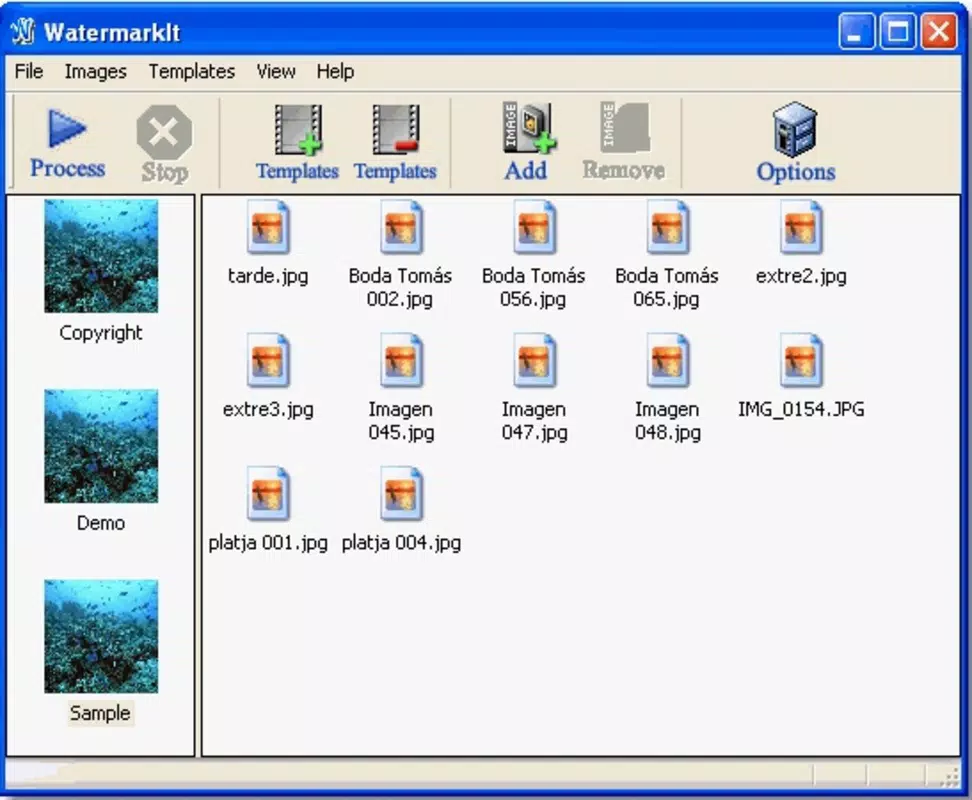
- Batch Processing: Users can apply watermarks to multiple photos simultaneously, significantly reducing time and effort. This is especially beneficial when preparing large sets of images for upload, such as for online portfolios or social media campaigns.
- Customizable Watermarks: The app supports text, image-based, or hybrid watermarks. This flexibility allows users to create unique identifiers that reflect their personal brand or professional identity.
- Text Watermark Options: Advanced controls include font selection, color customization, alignment settings, style adjustments (such as bold or italic), and border options to enhance visibility and aesthetic appeal.
- Save for Future Use: Once a watermark configuration is created, it can be saved and reused across future projects. This ensures consistency and streamlines workflow for recurring tasks.
- Transparency and Rotation Controls: Users can adjust the opacity of the watermark and rotate it to any angle, allowing for precise placement without obstructing key visual elements in the image.
For example, a photographer preparing a gallery for a client can use batch processing to watermark 50 images in seconds. A content creator managing a blog can save a branded watermark with their name and website, applying it consistently across all posts. These features enhance both security and workflow efficiency, making WatermarkIt a practical solution for image protection on smartphones.
Interface, UX & Performance
WatermarkIt features a clean, intuitive interface designed for ease of use, with logical navigation and clearly labeled tools. The layout prioritizes accessibility, allowing users to quickly access watermark settings, select images, and apply changes with minimal steps. Visual feedback is immediate, with real-time previews of how the watermark will appear on the image.
Although the developer did not list formal performance metrics, the app is described as lightweight, suggesting efficient resource usage and minimal impact on device performance. It is expected to function smoothly across a range of smartphone categories, from entry-level to high-end devices. Responsiveness is maintained during image selection and watermark application, with no reported lag or crashes in typical use scenarios. Stability appears consistent, particularly during batch processing operations, which are critical for user satisfaction.
The app maintains a consistent experience across different screen sizes and orientations, adapting layout elements appropriately. While no specific information was provided about compatibility with older OS versions, the long-standing release date indicates possible backward compatibility. Overall, the user experience is streamlined and focused on core functionality, minimizing distractions and maximizing utility.
Platform Compatibility & Technical Requirements
WatermarkIt is available on Android, supporting the latest version of the operating system. The app has a file size of 12.5 MB, which is compact and suitable for devices with limited storage. The developer did not specify minimum OS requirements or compatibility with iOS, nor did they provide details about specific hardware dependencies.
Given its release date in 2011, the app may have been originally designed for earlier Android versions, but current availability suggests ongoing support. Users should verify compatibility with their device’s OS version before installation. No additional permissions or system resources were disclosed, which may contribute to its lightweight footprint and secure operation.
Pros and Cons
Pros
- Lightweight and efficient with minimal storage usage
- Supports batch processing for multiple image protection
- Highly customizable watermarks using text, images, or both
- Option to save and reuse watermark templates
- Transparent watermarks preserve image quality
- Simple, intuitive interface suitable for all user levels
Cons
- Developer did not provide detailed technical specifications
- No information on iOS compatibility or cross-platform availability
- Specific OS version requirements were not listed
- Transparency and rotation settings may require trial and error for optimal placement
- No cloud sync or backup feature for saved watermarks
FAQ
Is WatermarkIt safe to download and use?
Yes, WatermarkIt is a secure utility app designed to protect your photos. It does not require excessive permissions and operates locally on your device, ensuring your images remain private during processing.
Can I use WatermarkIt on both Android and iOS?
The developer did not specify iOS compatibility. The app is confirmed for Android, but availability on iOS was not disclosed.
How do I save my custom watermark for future use?
After creating a watermark with your preferred settings, you can save it within the app. It will be stored in your library and accessible for reuse in subsequent projects.
Does WatermarkIt support batch watermarking?
Yes, WatermarkIt allows users to select multiple images and apply the same watermark to all of them at once, saving time and improving workflow efficiency.
What file formats does WatermarkIt support?
The developer did not provide specific details on supported image formats. However, common formats like JPEG and PNG are typically supported by similar apps.
Final Thoughts
WatermarkIt remains a dependable tool for anyone looking to protect their visual content with minimal effort. Its core strengths—batch processing, customizable watermarks, and the ability to save templates—make it a practical choice for photographers, content creators, and digital artists. The app’s lightweight design and user-friendly interface ensure accessibility across various skill levels and device types.
While some technical details are not publicly available, the app’s long-standing presence and consistent functionality suggest reliability. For users seeking a straightforward, secure way to safeguard their images before sharing online, WatermarkIt delivers real value. It fills a critical gap in personal digital protection without overcomplicating the process.
Download WatermarkIt now


